


Trusted by 1M+ creators
AI Halloween Generator
Generate custom Halloween images from text. Transform your photos into spooky Halloween avatars
No credit card required
4.6
2,100+ reviews














Create AI Images from Text
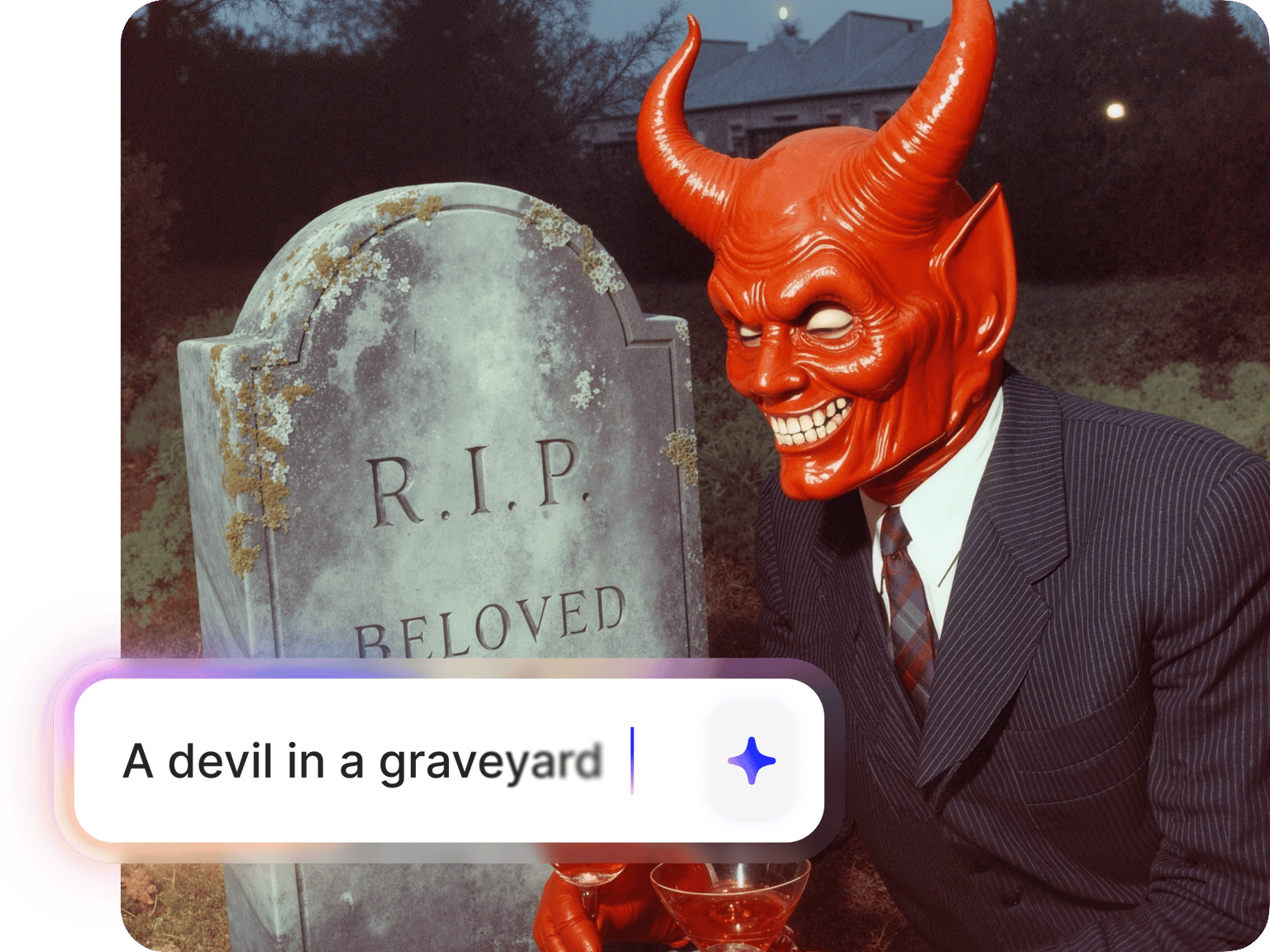
Create any Halloween AI image you can imagine
Stock photo searches and image templates take up too much time. Generate the perfect Halloween image in seconds—from spooky Halloween backgrounds to character portraits and event posters. Our AI Halloween generator processes your text prompts, and you can switch between multiple text-to-image models to find the perfect style.
Use Google Imagen 3 for photorealistic vampires and werewolves, or Ideogram v3 to render readable text for Halloween event posters. Make your images talk with Fabric 1.0. Or choose pre-made spooky characters like vampires, ghouls, and Frankenstein's monster. Try our AI Halloween generator now.
How to use our AI Halloween generator:
Step 01
Select an AI model and enter your Halloween prompt
Choose an AI image model and aspect ratio from our AI playground menu. You can use this prompt structure: [subject] + [setting] + [mood/lighting]. For example: "vampire in gothic castle with moonlit shadows" or "witch in abandoned cabin with eerie green glow."
Step 02
Generate and compare Halloween images
Test your prompt across different AI models to compare styles and quality. Try AI models such as Stable Diffusion 3 or Flux Pro AI for high-resolution detail.
Step 03
Download or animate image
Download your Halloween image for backgrounds, social posts, or wallpapers. Or click 'Make video' and type a motion prompt to animate it. Open our video editor to layer eerie soundtracks, add text overlays, and polish your Halloween content.
Learn More
Learn how to make Halloween videos with AI:
Switch between AI models to find your perfect Halloween aesthetic
Not all AI models create the same style. VEED's AI Halloween generator gives you access to multiple text-to-image models in one place. No juggling subscriptions or separate platforms. Generate photorealistic monsters with Imagen 3 Fast or stylized horror art with Flux Pro. With this flexibility, you're never locked into one AI's interpretation of "spooky."
Create custom Halloween backgrounds
Generate custom Halloween backgrounds for any platform—Instagram Reels, YouTube thumbnails, Zoom backgrounds, or desktop wallpapers. Plus, use your AI horror art as video backgrounds. Unlike stock sites that limit you to what’s available, our AI Halloween generator brings any idea to life.
Turn Halloween images into talking characters
Generate your Halloween image or choose from pre-made spooky characters like vampires, mummies, and ghosts. Add dialogue with text-to-speech or upload your own audio. Fabric 1.0 automatically syncs lip movements for natural Halloween talking videos. Edit with auto-captions and soundtracks, then export your video. Perfect for AI horror trends and viral Halloween content.
FAQ
Combine setting, subject, lighting, and mood for the best results. Here are some AI prompt examples:
- Halloween backgrounds: "abandoned haunted mansion ballroom with chandeliers," "misty cemetery with twisted iron gates at midnight"
- Characters: "gothic vampire portrait with candlelight shadows," "Victorian doll with cracked porcelain face"
- AI spooky photo prompts: "ghostly figure emerging from fog," "zombie hands reaching from grave dirt"
- Atmospheric scenes: "witch's lair with bubbling cauldrons and spell books," "dark forest with glowing eyes watching from shadows"
Describe the environment you want to see: [location] + [key elements] + [atmosphere/lighting]. For example, combine a setting like "cemetery" with elements like "twisted gates" and atmosphere like "moonlit fog." Download your image or add movement using image-to-video AI.
Yes. VEED Fabric 1.0 transforms AI-generated Halloween images into talking videos. Choose pre-made spooky characters like vampires, ghosts, and Frankenstein's monster, or upload your own creation. Add dialogue by recording your voice or using text-to-speech. The AI automatically syncs lip movements for natural-looking Halloween characters.
Creating Halloween images with text-to-image models requires AI credits included in paid plans. If you want to try generating AI images for free once, visit our AI image generator. Premium plans unlock HD exports and access to all text-to-image models. Check our pricing page for more information on AI credits and plan options.
Loved by creators.
Loved by the Fortune 500
“
With VEED I didn't need 15 tutorials - I jumped straight in and started editing.

Gwenne Wilcox
Founder,
Brand Brainery
“
You can go beyond choppping things. VEED actually makes my videos look great.
Michael Glover
Demand Gen Manager,
ConvertFlow
“
The first four videos i created with VEED got over 40,000 impressions on LinkedIn.

Travis Tyler
Senior Content Producer,
PandaDoc
“
I found VEED at the right time: if you're making UGC ads and not using Eye Contact Correction and Noise Reduction on VEED you're missing out on ROI.
Sebastian Schurgers
Head of Growth Marketing,
Gronda
“
With VEED I didn't need 15 tutorials - I jumped straight in and started editing.
Gwenne Wilcox
Founder,
Brand Brainery
“
You can go beyond choppping things. VEED actually makes my videos look great.
Michael Glover
Demand Gen Manager,
ConvertFlow
“
The first four videos i created with VEED got over 40,000 impressions on LinkedIn.
Travis Tyler
Senior Content Producer,
PandaDoc
“
I found VEED at the right time: if you're making UGC ads and not using Eye Contact Correction and Noise Reduction on VEED you're missing out on ROI.
Sebastian Schurgers
Head of Growth Marketing,
Gronda
“
The first four videos i created with VEED got over 40,000 impressions on LinkedIn.
Travis Tyler
Senior Content Producer,
PandaDoc
“
I found VEED at the right time: if you're making UGC ads and not using Eye Contact Correction and Noise Reduction on VEED you're missing out on ROI.
Sebastian Schurgers
Head of Growth Marketing,
Gronda
“
With VEED I didn't need 15 tutorials - I jumped straight in and started editing.
Gwenne Wilcox
Founder,
Brand Brainery
“
You can go beyond choppping things. VEED actually makes my videos look great.
Michael Glover
Demand Gen Manager,
ConvertFlow
Discover more
- 3D Mockup Generator
- AI 3D Model Generation
- AI Animal Generator
- AI Architecture Generator
- AI Art Generator
- AI Background Generator
- AI Book Cover Generator
- AI Car Generator
- AI Cartoon Generator
- AI City Generator
- AI Clothing Generator
- AI Comic Generator
- AI Couple Photo Maker
- AI Creator
- AI Diagram Generator
- AI Doodle Generator
- AI Drawing
- AI Face Generator
- AI Favicon Generator
- AI Flag Generator
- AI Food Generator
- AI Furniture Design
- AI Game Generator
- AI Generated Boy
- AI Giantess
- AI Girl Generator
- AI Graffiti Generator
- AI Headshot Generator
- AI House Generator
- AI Icon Generator
- AI Jersey Generator
- AI Jewelry Design
- AI Landscapes
- AI Logo Generator
- AI Manga
- AI Map Generator
- AI Meme Generator
- AI Mind Map Generator
- AI Monster Generator
- AI Painting
- AI Person Generator
- AI Photoshoot Generator
- AI Pixel Art Generator
- AI Portrait Generator
- AI Poster Generator
- AI Product Design
- AI Profile Picture Generator
- AI Selfie Generator
- AI Sticker Generator
- AI Superhero Generator
- AI T-Shirt Design Generator
- AI Tattoo Generator
- AI Texture Generator
- AI Thumbnail Maker
- AI Vector Generator
- AI Wallpaper Generator
- Album Cover Maker
- Anime AI Generator
- Caricature Maker
- Character Generator
- Chibi Maker
- Clipart Maker
- Cyberpunk Character Creator
- Dark Fantasy AI
- Fantasy Character Creator
- Flower Generator
- Illustration Generator
- Mythical Creature Generator
- Pattern Generator
- Random Drawing Generator
- Random Image
- Realistic AI Image Generator
- Scene Generator
- Seedream
- Square Face Generator
- Text to Image
- Villain Generator
- Wall Art Generator
Explore related tools
More from VEED

The 16 Best AI Art Generators of All Time: Unleash Your Creativity!
Unlock your creativity! Check out our roundup of the best AI art generators to try in 2025.

AI Video Production: What's Possible and Where to Get Started
Dipping your toes in AI video production? Use this starter guide to hit the ground running and produce your first masterpiece.

How to Make AI Videos with VEED: Bring Your Ideas to Life
Want to learn how to make AI videos with VEED? Check out this starter guide to take your video projects from A to Z in the blink of AI.
Trusted by 1M+ creators
When it comes to amazing videos, all you need is VEED
No credit card required
More than an AI Halloween video generator
Beyond Halloween content, VEED offers a complete suite of AI-powered video creation tools for year-round marketing success. From text-to-video generators and automated subtitles to professional transitions and brand kits, we help social media managers create engaging content 10x faster. Explore our full platform to transform your entire content workflow, not just your seasonal campaigns.