


Trusted by 1M+ creators
Resize Video for Instagram
Resize your videos for Instagram, YouTube,Twitter and more - with a single click!
No credit card required
4.6
2,100+ reviews















Resize your Video for Instagram online!
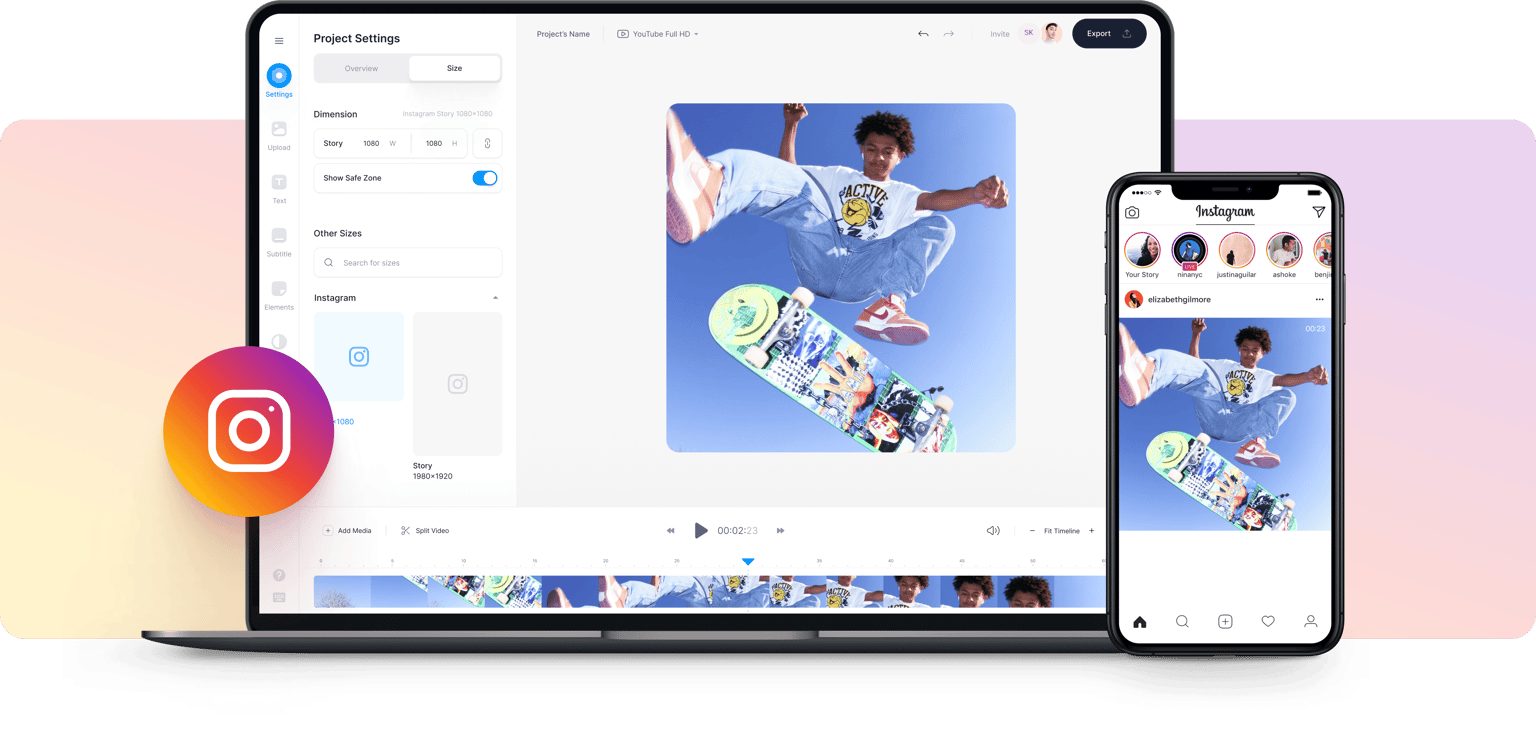
Spending hours cropping videos and getting your video resolution pixel perfect? With VEED you can click a single button and resize your video content for Instagram, YouTube, Twitter, Facebook, and more. One-click transforms your video footage into perfect Insta-ready clips, in the appropriate aspect ratios. Concerned about the loss of quality? Our video editing software resizes your video to its new dimensions while maintaining perfect image quality. No blurring or awkward stretching. We know how important your video content is. Our intuitive, online software helps you make awesome videos for social media in a matter of seconds. Resize your videos for Instagram with VEED to increase audience engagement and maximize productivity!
How to Resize Your Videos for Instagram
Step 01
Upload
Go to VEED’s ‘Video Resizer’ and upload your video! Click on ‘Get Started Now’ to begin!
Step 02
Resize
Click ‘Settings’, then click ‘Size’ for the canvas dropdown menu. For Instagram dimensions, choose square (1:1), or for Instagram Story (9:16). Click and drag the corners of your video to fit within the new aspect ratio frame.
Step 03
Download
Download the file as an MP4 (compatible with Instagram) and share your resized video with followers, family, and friends!
Learn More
‘Resize Video for Instagram’ Tutorial
No loss in quality
When resizing your videos online, you don’t want to be worried about losses in image quality. With VEED you can click a button and resize your video’s canvas, then choose from a range of export options including 1080p, and even 4K! Never lose a pixel when resizing with our simple online editing app!
Awesome content
As creators ourselves, we know producing awesome video content is essential. You need a video editor that will support your ambitions. VEED’s video editor helps create your best content and expand your creativity. With our easy-to-use video editor, your videos can reach a wider audience and provide quality, professional content for your followers.
Engage your audience
Want your videos to be viewed globally? Want to establish an audience that keeps coming back for more content? VEED’s video resizer and a suite of editing tools mean optimizing your content and maximizing audience engagement is easy. You can resize your videos online and connect to your audience, anytime, from anywhere.
FAQ
To resize your video: 1. Upload your video 2. Choose a new aspect ratio to fit desired dimensions 3. Click and drag corners of the video to fit the new aspect ratio 4. Share your resized video!
For Instagram aspect ratios there is; 4:5 portrait, 1:1 square, 1.91:1 landscape. Other aspect ratios include: - Reels - 1080px x 1920px | 9:16 - IG Stories- 1080px x 1920px | 9:16 (vertical video) - IGTV video- Vertical video, 9:16 | Horizontal video, 16:9
Your MP4 video is your video file type that needs to be encoded so it is compatible with Instagram. To resize a video: 1. Upload your video 2. Choose a new aspect ratio to fit desired dimensions 3. Click and drag corners of the video to fit the new aspect ratio 4. Share your resized video!
You can post different formats of videos to your Instagram. - Videos for your feed: - Encoded in MP4 - Framerate of no more than 30fps - Footage has a limit of 60 seconds and cannot be more than 4GB Videos for your stories: - Encoded in MP4 - Framerate of no more than 30fps - Your stories have a capacity of 15 seconds. - Instagram will separate them into 15-second segments. Videos for IGTV: (Instagram’s long-form videos, with two file size limits) - 15-minute videos- 650MB - 60 minute videos- 3.6GB - They need to be encoded in MP4 - Framerate of at least 30fps For best results, all videos should be encoded with: - Video codec—H.264 - Video bitrate—3,500 Kbps - Audio codec—AAC - Audio sample rate—44.1 kHz
It depends on how you want to edit your videos. With VEED, simply start by uploading your video and begin editing to your preferences, with ‘’ of editing options!
Loved by creators.
Loved by the Fortune 500
“
With VEED I didn't need 15 tutorials - I jumped straight in and started editing.

Gwenne Wilcox
Founder,
Brand Brainery
“
You can go beyond choppping things. VEED actually makes my videos look great.

Michael Glover
Demand Gen Manager,
ConvertFlow
“
The first four videos i created with VEED got over 40,000 impressions on LinkedIn.

Travis Tyler
Senior Content Producer,
PandaDoc
“
I found VEED at the right time: if you're making UGC ads and not using Eye Contact Correction and Noise Reduction on VEED you're missing out on ROI.

Sebastian Schurgers
Head of Growth Marketing,
Gronda
“
With VEED I didn't need 15 tutorials - I jumped straight in and started editing.
Gwenne Wilcox
Founder,
Brand Brainery
“
You can go beyond choppping things. VEED actually makes my videos look great.
Michael Glover
Demand Gen Manager,
ConvertFlow
“
The first four videos i created with VEED got over 40,000 impressions on LinkedIn.
Travis Tyler
Senior Content Producer,
PandaDoc
“
I found VEED at the right time: if you're making UGC ads and not using Eye Contact Correction and Noise Reduction on VEED you're missing out on ROI.
Sebastian Schurgers
Head of Growth Marketing,
Gronda
“
The first four videos i created with VEED got over 40,000 impressions on LinkedIn.
Travis Tyler
Senior Content Producer,
PandaDoc
“
I found VEED at the right time: if you're making UGC ads and not using Eye Contact Correction and Noise Reduction on VEED you're missing out on ROI.
Sebastian Schurgers
Head of Growth Marketing,
Gronda
“
With VEED I didn't need 15 tutorials - I jumped straight in and started editing.
Gwenne Wilcox
Founder,
Brand Brainery
“
You can go beyond choppping things. VEED actually makes my videos look great.
Michael Glover
Demand Gen Manager,
ConvertFlow
Discover more
More from VEED

How To Resize Video For Instagram For Free (Quick And Easy)
Learn how to resize videos for Instagram in SECONDS with VEED.

The Best Instagram Video Formats and Specifications for 2023
By the end of this article, you’ll know how to use Instagram’s four video formats, find the best Instagram video editing program for beginners, and even figure out why your Instagram Stories look blurry. We’re going to make you a professional in no time!

How to Share a YouTube Video on Instagram
Sharing content from youtube to Instagram can be a challenge but it doesn't have to be. Here's how to share your YouTube video to Instagram in a few simple clicks.
Trusted by 1M+ creators
When it comes to amazing videos, all you need is VEED
No credit card required
More than Video Resizing for Instagram
VEED makes creating video content easy and fun. VEED is a powerful video editor that enables thousands of users each month to create incredible videos that drive engagement, attract followers, and boost sales. Try VEED today and see what you can do with your content!