


Trusted by 1M+ creators
Square Face Generator
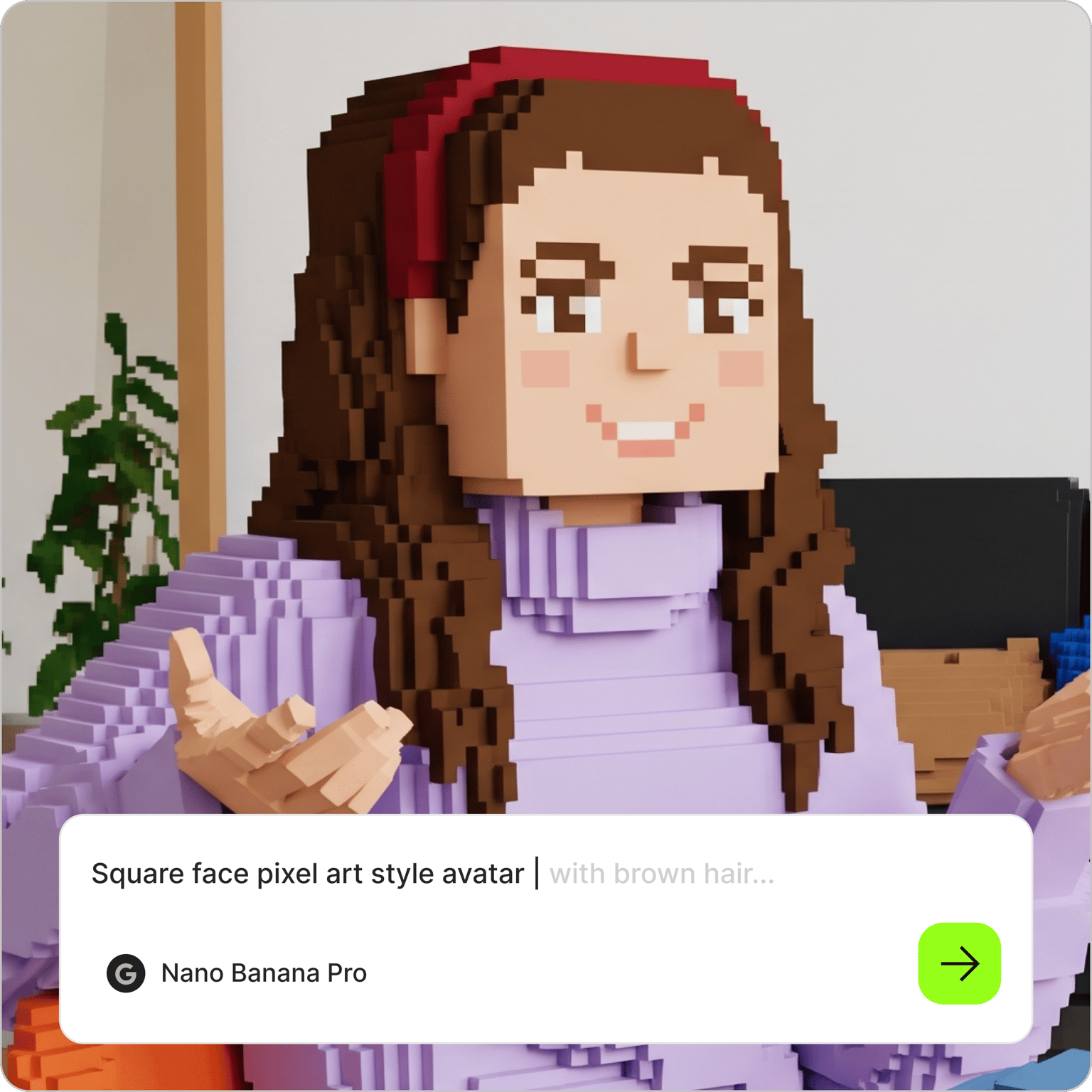
A square pfp generator that makes cute blocky avatars from a prompt, no parts menu needed
No credit card required
4.6
2,100+ reviews













Create AI Images from Text
Your square face pfp, made in seconds
Type what your square face should look like, pick a size, and the square face generator draws it. Pastel skin, side-swept bangs, round glasses, a tiny blush, a plain mint background. VEED's AI image generator turns that sentence into a square face icon you can set as a profile picture.
Discord users make a matching set for a friend group. Developers use one as a neutral avatar for GitHub and forums. Streamers generate one for every mood. If you want it based on your face, upload a selfie to the AI image editor and ask for a square face version of you.
How to make a square face icon:
Step 01
Type a prompt
Describe the face: skin tone, hair, eyes, expression, accessories, and background. "Cute square pixel face, short black hair, closed happy eyes, pink blush, lavender background" is a good starting point. Set the aspect ratio to 1:1 so it crops cleanly as a profile picture.
Step 02
Generate and compare
Run it and see a few versions. Change one detail at a time, swap the bangs for a bob or the blush for freckles, and generate again until it feels like you. You can keep the default model or pick another to compare results.
Step 03
Download and set it as your pfp
Save the icon and upload it to Discord, GitHub, X, or wherever you need a profile picture. Generate a second one in the same style for a banner, or animate it with image-to-video AI for a short intro clip.
Learn More
Learn how to access AI image models:
Make a square face for every mood and season
Classic square face tools build a face from a menu of parts. Here you describe it once and change a word to get a new one. Add "Santa hat" in December, "sunglasses" in July, "sleepy eyes" for a late-night stream. Generate a happy, a grumpy, and a surprised version from the same prompt and rotate them, or make a matching set for the whole group chat with the same background color.
A square icon face generator that goes beyond the classic pixel look
Ask for the nostalgic 2010s pixel style and you get the blocky face with the soft palette people remember. Ask for flat vector, a chibi anime look, a tiny 3D clay render, or a hand-drawn marker sketch, and the AI image generator draws the same character in that style. Mention a brand color for the background if the icon is for a work account. Every version downloads ready for an avatar slot.
Give your square face a voice
A profile picture can also be a character. Upload the icon to talking photo and it can be animated to read an intro, present a short update, or front a channel trailer. Pair it with AI voice cloning and the character speaks in your voice from a typed script, so your avatar can introduce your stream or answer questions while you stay off camera. Add captions and export for Discord, YouTube, or TikTok.
FAQ
Open VEED's square face generator, describe the face in the prompt field, and generate. Mention hair, eyes, expression, one accessory, and a background color, and set the aspect ratio to 1:1. Download the version you like as a profile picture, or tweak the prompt for another take.
No. The classic tool builds a face by picking parts from a menu, and the many copies of it online do the same. VEED's square face generator draws the face from a text description, so you get the same cute blocky look plus details, styles, and expressions the parts menus never included.
Yes. Upload a selfie to the AI image editor, describe the square face style you want, and it generates a version of you in that look. For a group, each person does the same with one shared prompt. Keep the prompt identical and the backgrounds, line weight, and palette stay consistent across the set.
Generating an icon uses AI credits. Each AI model costs a different number of credits per image, generating more than one version costs more, and the credit cost shows on screen before you generate. Paid plans include AI credits, and the VEED pricing page lists what each plan includes.
Generate at 1:1 and download it. Most platforms accept a square image and resize it, and Discord, GitHub, and X display it cropped to a circle or a rounded square, so keep the character centered with some padding around it. If you need it larger for a banner or print, run it through the image upscaler.
Loved by creators.
Loved by the Fortune 500
“
With VEED I didn't need 15 tutorials - I jumped straight in and started editing.
Gwenne Wilcox
Founder,
Brand Brainery
“
You can go beyond choppping things. VEED actually makes my videos look great.
Michael Glover
Demand Gen Manager,
ConvertFlow
“
The first four videos i created with VEED got over 40,000 impressions on LinkedIn.

Travis Tyler
Senior Content Producer,
PandaDoc
“
I found VEED at the right time: if you're making UGC ads and not using Eye Contact Correction and Noise Reduction on VEED you're missing out on ROI.
Sebastian Schurgers
Head of Growth Marketing,
Gronda
“
With VEED I didn't need 15 tutorials - I jumped straight in and started editing.
Gwenne Wilcox
Founder,
Brand Brainery
“
You can go beyond choppping things. VEED actually makes my videos look great.
Michael Glover
Demand Gen Manager,
ConvertFlow
“
The first four videos i created with VEED got over 40,000 impressions on LinkedIn.
Travis Tyler
Senior Content Producer,
PandaDoc
“
I found VEED at the right time: if you're making UGC ads and not using Eye Contact Correction and Noise Reduction on VEED you're missing out on ROI.
Sebastian Schurgers
Head of Growth Marketing,
Gronda
“
The first four videos i created with VEED got over 40,000 impressions on LinkedIn.
Travis Tyler
Senior Content Producer,
PandaDoc
“
I found VEED at the right time: if you're making UGC ads and not using Eye Contact Correction and Noise Reduction on VEED you're missing out on ROI.
Sebastian Schurgers
Head of Growth Marketing,
Gronda
“
With VEED I didn't need 15 tutorials - I jumped straight in and started editing.
Gwenne Wilcox
Founder,
Brand Brainery
“
You can go beyond choppping things. VEED actually makes my videos look great.
Michael Glover
Demand Gen Manager,
ConvertFlow
Discover more
- 3D Mockup Generator
- AI 3D Model Generation
- AI Animal Generator
- AI Architecture Generator
- AI Art Generator
- AI Background Generator
- AI Book Cover Generator
- AI Car Generator
- AI Cartoon Generator
- AI City Generator
- AI Clothing Generator
- AI Comic Generator
- AI Couple Photo Maker
- AI Creator
- AI Diagram Generator
- AI Doodle Generator
- AI Drawing
- AI Face Generator
- AI Favicon Generator
- AI Flag Generator
- AI Food Generator
- AI Furniture Design
- AI Game Generator
- AI Generated Boy
- AI Giantess
- AI Girl Generator
- AI Graffiti Generator
- AI Halloween Generator
- AI Headshot Generator
- AI House Generator
- AI Icon Generator
- AI Jersey Generator
- AI Jewelry Design
- AI Landscapes
- AI Logo Generator
- AI Manga
- AI Map Generator
- AI Meme Generator
- AI Mind Map Generator
- AI Monster Generator
- AI Painting
- AI Person Generator
- AI Photoshoot Generator
- AI Pixel Art Generator
- AI Portrait Generator
- AI Poster Generator
- AI Product Design
- AI Profile Picture Generator
- AI Selfie Generator
- AI Sticker Generator
- AI Superhero Generator
- AI T-Shirt Design Generator
- AI Tattoo Generator
- AI Texture Generator
- AI Thumbnail Maker
- AI Vector Generator
- AI Wallpaper Generator
- Album Cover Maker
- Anime AI Generator
- Caricature Maker
- Character Generator
- Chibi Maker
- Clipart Maker
- Cyberpunk Character Creator
- Dark Fantasy AI
- Fantasy Character Creator
- Flower Generator
- Illustration Generator
- Mythical Creature Generator
- Pattern Generator
- Random Drawing Generator
- Random Image
- Realistic AI Image Generator
- Scene Generator
- Seedream
- Text to Image
- Villain Generator
- Wall Art Generator
Explore related tools
Trusted by 1M+ creators
When it comes to amazing videos, all you need is VEED
No credit card required
More than a square face generator
A square face icon is one small thing VEED can make. VEED is an AI video creation platform, so the avatar can keep going: animate it with image-to-video AI for a looping intro, or generate a matching banner from scratch with the AI image generator. Build your channel kit, intro included, with the intro maker. Try VEED and see what you can make.