

Trusted by 1M+ creators
AI Video Editor
Edit videos in minutes with auto-editing technology. Enhance existing footage or create content by describing your idea
No credit card required
4.6
2,100+ reviews















Free AI video editor online: automatic edits in a few clicks
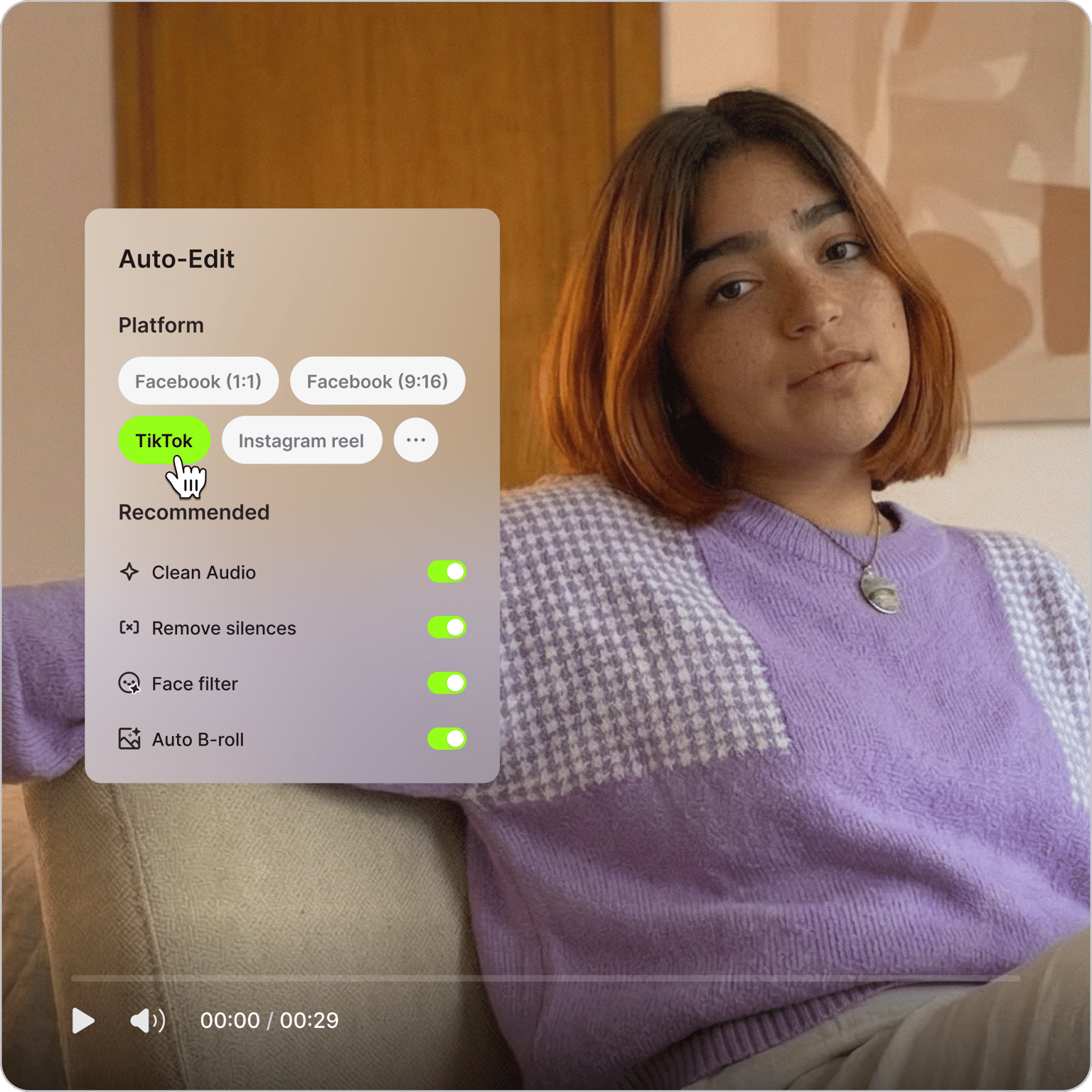
Our AI video editor cuts down your editing time from hours to minutes. Upload your raw footage and let Auto Edits handle the rest: remove unwanted pauses, clean your audio, add subtitles, and insert B-roll. No manual scrubbing through timelines.
Need to create videos from scratch? Type your idea in our AI video generator. Our AI builds a complete video with voiceovers, matching visuals, and captions. Whether you have existing footage or a new idea, VEED turns it into a post-ready video in minutes.
How to use the AI video editor:
Step 01
Tell us about your video
Click ‘Start auto edits.’ Select your video type and goal, then choose your preferred social media format.
Step 02
Upload your footage
Import the video you want to auto-edit. Our AI video editor works well with social media videos, product demos, and marketing content.
Step 03
Apply AI edits
Select automatic edits like noise removal, eye contact correction, and AI B-roll to enhance your video. Download your video or fine-tune it in our AI video editor.
Learn More
Learn how to edit videos with text:
Professional AI video editing software, without the pro price tag
Get pro-level video edits even without expensive software or a huge production team. VEED's AI video editing software handles the tedious work so you can focus on creativity. Upload your footage and let Auto Edits enhance it with subtitles, audio cleanup, and platform optimization. You can also create personalized narration with our voice cloning tool. Marketers use VEED to produce more videos faster, without the editing bottleneck.
Highlight the best moments in your videos
Turn your raw footage into polished videos. Our filler remover cuts out the ums, ahs, and awkward pauses. Just upload your video, and our AI trims it in seconds, a fraction of the time it would take manually. You can also add music, sound effects, and background tracks to make your videos even more engaging.
AI video editing tools for beginners and pros alike
Edit videos without the steep learning curve. It's simple with VEED's intuitive tools and drag-and-drop interface. Every AI video editing tool lives in the same workspace: auto-generate subtitles, dub your videos in many languages, and export for any platform. No need to navigate complicated software or jump between tools.
FAQ
Yes. VEED's AI-powered video editor can enhance your videos in minutes. Upload your footage, and our AI automatically adds subtitles, cleans audio, inserts B-roll footage, and resizes your video for your preferred platform.
Yes, our AI video editor is free online, including the Auto Edits tool for video enhancement. You can also try AI B-roll, filler word removal, face filters, noise removal, and more for free. Upgrade to a premium plan for watermark-free exports and complete access to our AI video creation platform.
Yes. VEED works as an AI video editing app in your browser on Mac, Windows, and Chromebook, with nothing to download, and the VEED mobile app brings the same auto edits to your phone. Upload footage, apply auto edits like subtitles, audio cleanup, and B-roll, then export in the format your platform needs. Start on any device and export from the same account.
Use VEED’s AI editing software. Upload your footage and use Auto Edits:
- Automatic subtitle generation with synchronized timing
- Audio cleaning and enhancement in one click
- B-roll insertion for supporting visuals
- Platform-specific resizing (TikTok, Instagram, YouTube, LinkedIn)
- Safe zone previews showing how your content will look on your chosen platform
Here are ways to use AI to create videos:
- Text to video. Type a prompt or paste your script, and VEED generates a complete video with visuals and voiceovers.
- Image to video. Use VEED Fabric 1.0 to turn a still photo into a realistic talking video — perfect for creating personalized content from a single image.
- Video to video. Swap subjects, create realistic character videos from references, and add or delete elements in your video.
Yes. Create YouTube-ready videos with AI in two ways:
- Start from scratch with our AI video making software. Describe your idea or paste your script, and VEED generates a complete video with matching visuals and voiceovers.
- Edit your existing footage with our AI YouTube video editor. Upload your raw clips and automatically clean your audio, add subtitles, insert B-roll, and resize everything to YouTube's format.
Loved by creators.
Loved by the Fortune 500
“
With VEED I didn't need 15 tutorials - I jumped straight in and started editing.

Gwenne Wilcox
Founder,
Brand Brainery
“
You can go beyond choppping things. VEED actually makes my videos look great.

Michael Glover
Demand Gen Manager,
ConvertFlow
“
The first four videos i created with VEED got over 40,000 impressions on LinkedIn.

Travis Tyler
Senior Content Producer,
PandaDoc
“
I found VEED at the right time: if you're making UGC ads and not using Eye Contact Correction and Noise Reduction on VEED you're missing out on ROI.

Sebastian Schurgers
Head of Growth Marketing,
Gronda
“
With VEED I didn't need 15 tutorials - I jumped straight in and started editing.
Gwenne Wilcox
Founder,
Brand Brainery
“
You can go beyond choppping things. VEED actually makes my videos look great.
Michael Glover
Demand Gen Manager,
ConvertFlow
“
The first four videos i created with VEED got over 40,000 impressions on LinkedIn.
Travis Tyler
Senior Content Producer,
PandaDoc
“
I found VEED at the right time: if you're making UGC ads and not using Eye Contact Correction and Noise Reduction on VEED you're missing out on ROI.
Sebastian Schurgers
Head of Growth Marketing,
Gronda
“
The first four videos i created with VEED got over 40,000 impressions on LinkedIn.
Travis Tyler
Senior Content Producer,
PandaDoc
“
I found VEED at the right time: if you're making UGC ads and not using Eye Contact Correction and Noise Reduction on VEED you're missing out on ROI.
Sebastian Schurgers
Head of Growth Marketing,
Gronda
“
With VEED I didn't need 15 tutorials - I jumped straight in and started editing.
Gwenne Wilcox
Founder,
Brand Brainery
“
You can go beyond choppping things. VEED actually makes my videos look great.
Michael Glover
Demand Gen Manager,
ConvertFlow
Discover more
- AI Animation Generator
- AI Art Video Generator
- AI Course Creator
- AI Marketing Video Generator
- AI Movie Generator
- AI Music Video Generator
- AI News Generator
- AI Reel Generator
- AI Stock Video Generator
- AI Training Video Generator
- AI UGC
- AI Video Demo
- AI Video Generator
- AI Video Maker
- AI Visual Generator
- AI YouTube Video Maker
- Animate from Audio
- Article to Video
- Blog to Video
- Faceless Videos
- Idea to Video
- Script to Video
- Seedance AI Video
- Text to Animation AI
- Text to Video AI
- TikTok Video Generator
- Veo 3
- Video Generators
- Viral AI Video Generator
- YouTube Shorts Maker
Explore related tools
More from VEED

AI Video Production: What's Possible and Where to Get Started
Dipping your toes in AI video production? Use this starter guide to hit the ground running and produce your first masterpiece.

How to Make AI Videos with VEED: Bring Your Ideas to Life
Want to learn how to make AI videos with VEED? Check out this starter guide to take your video projects from A to Z in the blink of AI.
VEED vs. Quso AI: Which AI Video Editor Fits Your Workflow?
Quso AI makes sense for podcasters or YouTubers who primarily want to repurpose existing footage. For marketers, businesses, and content creators who need versatility, VEED is the more complete solution.
Trusted by 1M+ creators
When it comes to amazing videos, all you need is VEED
No credit card required
More than an AI video editor
Editing a video or starting from scratch? VEED is an AI video creation platform where you can generate, enhance, and repurpose videos all in one workflow. Start from existing footage, a text prompt, or a reference image. Try the best AI models for text-to-video, image-to-video, and video-to-video generation. Add captions, animations, and your branding. Marketers use VEED to make video that looks like their brand made it, not AI. Sign up now to get started.