


Trusted by 1M+ creators
Photo to Watercolor
Turn photo into watercolor with AI
No credit card required
4.6
2,100+ reviews















Turn photo into watercolor with AI
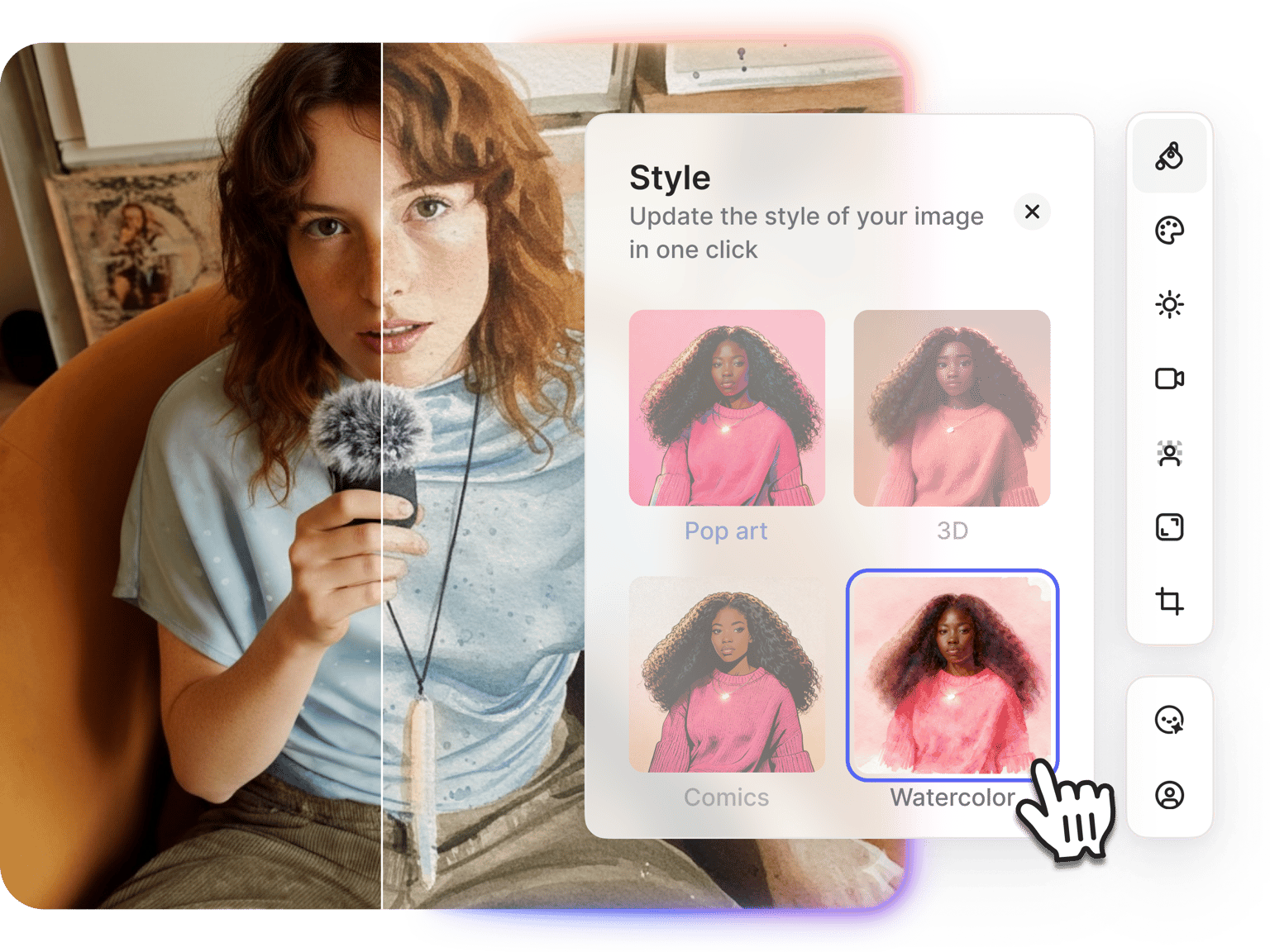
Convert photos to watercolor paintings with VEED's AI watercolor generator. No need to limit your options to preset watercolor filters. You can describe the style you want, and the AI generates it. Prompt for soft color washes, bold brush strokes, dreamy landscape effects, or detailed portrait-style watercolors. Upload your image, type your prompt, and generate watercolor art for social media posts, custom prints, personalized gifts, or digital art projects.
How to convert photo to watercolor:
Step 01
Upload your image
Upload the photo you want to convert to watercolor. You can upscale low-resolution images first if needed.
Step 02
Describe the watercolor style
Describe the watercolor effect you want: "Soft watercolor wash with pastel tones," "Bold impressionist brushstrokes," or "Dreamy landscape with blended colors." You can also click the watercolor preset in our Style menu.
Step 03
Download or create a video
Save your watercolor image or generate variations with different prompts. You can also animate your watercolor art with image-to-video AI or add it to video projects.
Learn More
Watch this Nano Banana Pro demo:
AI watercolor generator with prompt control
Most watercolor filter tools give you preset effects with limited customization. VEED's AI watercolor generator lets you describe exactly what you want. Need soft washes for a serene landscape? Or want bold, saturated strokes for a vibrant portrait? Simply describe it in plain language. The AI interprets your prompt and generates watercolor paintings that match your vision, giving you more creative control.
Multiple watercolor styles in one tool
Different images work better with different watercolor techniques. VEED gives you access to multiple AI models optimized for various watercolor styles. Some models excel at loose, flowing washes for landscapes and nature scenes. Others handle detailed brushwork better for portraits and close-up shots. Test different models with the same prompt to see which delivers the watercolor effect you're looking for. Switch between models all in one centralized platform.
Photo to watercolor tool that connects to video creation
Most watercolor converters stop at image downloads. VEED connects your watercolor art to video workflows. After converting your photo to watercolor, animate it with image-to-video AI to create moving paintings. Add watercolor images to video projects with text overlays, music, and transitions. You can also use watercolor portraits as video thumbnails or social media content.
FAQ
Upload your image to VEED's AI image editor, select an AI model, and describe the watercolor style you want in the prompt field. The AI converts your picture to a watercolor painting based on your description. Download the result or test different prompts for variations.
Watercolor photos are great for social media content with a creative twist, custom art prints, personalized gifts, digital art projects, website graphics, book illustrations, greeting cards, and wall art. You can also animate watercolor images with our image-to-video AI for video content.
Describe the watercolor style you want in simple terms. Use prompts like "soft watercolor portrait," "vibrant landscape with bold brushstrokes," or "dreamy watercolor with pastel washes." Be specific about the mood, color intensity, and brushwork style you're aiming for.
VEED uses a credit-based system. Each AI model costs a different number of credits per generation. You'll see the exact credit cost before you generate, so you can choose models that fit your budget. Check our pricing page for plan details and credit options.
Loved by creators.
Loved by the Fortune 500
“
With VEED I didn't need 15 tutorials - I jumped straight in and started editing.

Gwenne Wilcox
Founder,
Brand Brainery
“
You can go beyond choppping things. VEED actually makes my videos look great.

Michael Glover
Demand Gen Manager,
ConvertFlow
“
The first four videos i created with VEED got over 40,000 impressions on LinkedIn.

Travis Tyler
Senior Content Producer,
PandaDoc
“
I found VEED at the right time: if you're making UGC ads and not using Eye Contact Correction and Noise Reduction on VEED you're missing out on ROI.

Sebastian Schurgers
Head of Growth Marketing,
Gronda
“
With VEED I didn't need 15 tutorials - I jumped straight in and started editing.
Gwenne Wilcox
Founder,
Brand Brainery
“
You can go beyond choppping things. VEED actually makes my videos look great.
Michael Glover
Demand Gen Manager,
ConvertFlow
“
The first four videos i created with VEED got over 40,000 impressions on LinkedIn.
Travis Tyler
Senior Content Producer,
PandaDoc
“
I found VEED at the right time: if you're making UGC ads and not using Eye Contact Correction and Noise Reduction on VEED you're missing out on ROI.
Sebastian Schurgers
Head of Growth Marketing,
Gronda
“
The first four videos i created with VEED got over 40,000 impressions on LinkedIn.
Travis Tyler
Senior Content Producer,
PandaDoc
“
I found VEED at the right time: if you're making UGC ads and not using Eye Contact Correction and Noise Reduction on VEED you're missing out on ROI.
Sebastian Schurgers
Head of Growth Marketing,
Gronda
“
With VEED I didn't need 15 tutorials - I jumped straight in and started editing.
Gwenne Wilcox
Founder,
Brand Brainery
“
You can go beyond choppping things. VEED actually makes my videos look great.
Michael Glover
Demand Gen Manager,
ConvertFlow
Discover more
- Add Jewelry to Photo
- Add Noise to Image
- Add Text to Photo
- AI Action Figure Generator
- AI Background Changer
- AI Blog Post Image Generator
- AI Business Card Generator
- AI Christmas Photo
- AI Clothes Changer
- AI Color Correction
- AI Coloring Page Generator
- AI Cosplay
- AI Doll Generator
- AI Embroidery Generator
- AI Expression Changer
- AI Face Editor
- AI Fairy
- AI Family Portrait
- AI Filter Remover
- AI Flyer Generator
- AI Ghostface Generator
- AI God Image Editor
- AI Greeting Card Generator
- AI Hair Color Changer
- AI Hairstyle Changer
- AI Image Variation Generator
- AI Leprechaun Generator
- AI LinkedIn Photo
- AI Magazine Cover Generator
- AI Makeup
- AI Mascot Generator
- AI Mask Generator
- AI Mugshot Generator
- AI NFT Generator
- AI Passport Photo
- AI Pet Portrait Generator
- AI Photo Restoration
- AI Pinup Generator
- AI Pose Changer
- AI Product Photography
- AI Renaissance Painting
- AI Replace
- AI Room Design
- AI Sculpture
- AI Shoe Generator
- AI Smile Generator
- AI Snow
- AI Stencil Maker
- AI Time Machine
- AI Vintage Photo Generator
- AI Wedding Photo Generator
- AI Yourself
- Baby Face Generator
- Bald Filter
- Beard Filter
- Body Shape Editor
- Buzz Cut Filter
- Change Color of Image
- Change Eye Color AI
- Color Palette Generator
- Furry AI Generator
- Image Text Enhancer
- Medal Generator
- Object Remover
- Old Filter
- Photo Angle Change AI
- Photo Date Editor
- Photo to Sketch
- Pop Art Generator
- Relight Photo
- Sketch to Image AI
- Speech Bubble
- Stained Glass Generator
- Steampunk AI Generator
- Thanksgiving AI
- Tie Dye Generator
- Turn Photo into Line Drawing
More from VEED
Best AI Image Generators: Top Tools for Creating Stunning Visuals in 2026
From text prompts to breathtaking visuals in mere seconds, AI image generators have revolutionized the way we create digital art. Whether you're building content for social, school, or just for fun, turning ideas into visuals has never been easier. This guide breaks down the best AI image generators of 2025. You'll see what each tool does well, where it struggles, and who it’s built for, so you can pick the right one for your goals and budget.

AI Art Prompts: How to Write Better Prompts, Creative Examples, and Tools to Try
Getting your AI art prompts is the key to winning with generative AI tools. Learn how to write better prompts here.

How to Cartoonize Your Photo with AI (Step-by-Step Guide)
Learn how to cartoonize your photo using AI, and how to use ChatGPT to craft the perfect visual prompt to bring your unique style to life.
Trusted by 1M+ creators
When it comes to amazing videos, all you need is VEED
No credit card required
More than a photo to watercolor converter
Your watercolor artwork is ready — now take it further. VEED is an AI video creation platform where you can try the best AI models for image-to-video generation. Animate your images by describing motion, or build talking videos with our lip sync video generator. You can even generate paintings from scratch or create art videos by typing prompts. Generate, edit, and export all in one place. No more switching platforms. Start creating now.