Creating videos that look and sound professional is no longer optional. Whether you’re a social media manager, a business owner, or a creator, you need content that grabs attention and builds engagement fast.
But let’s be real. Editing videos takes time. You film something great, then spend hours trimming clips, cleaning up audio, and syncing captions. By the time you’re done, the trend has already moved on.
That’s why we built VEED Flow.
We've just shattered the video production bottleneck with VEED Flow—an AI-powered suite that revolutionizes your entire production process. It brings every step into a single, seamless flow, from editing by text and removing background noise to adding dynamic subtitles and collaborating with your team.
With VEED Flow, the videos practically make themselves. Let’s unpack it.
What is VEED Flow?
VEED Flow combines three of VEED’s most powerful tools into one seamless experience. Each tool removes a major pain in the creation of talking head videos, helping you create professional videos without getting stuck in the editing weeds.
Here’s what’s inside:
- Edit with Script: Edit your video as easily as editing a document. You can delete sentences, trim sections, and create clips just by editing the text transcript. Forget fiddly timelines. If you can edit words, you can edit videos.
- Clean Audio: Say goodbye to noisy recordings. VEED’s Clean Audio tool removes background noise, hums, and echoes with one click, leaving your voice crisp and professional. It’s the fastest way to make your message clear and engaging.
- Dynamic Subtitles: Subtitles are essential for engagement, but they also need to look on-trend. Dynamic Subtitles automatically add stylish, moving captions that fit perfectly with today’s platform trends. You can also upload your own fonts to your Brand Kit to make sure your videos always stay true to your brand.
- Brand Kit: Store all of your brand assets—logo variations, fonts, B-roll, and more—in one place. Every team member on your workspace can access these assets right inside the VEED editor, and ensure the videos they create are on-brand, every time.
- Collaboration: Invite team members and stakeholders to your VEED projects. Leave comments and even direct edits to make feedback-sharing and collaboration as seamless as possible.
How and where to try these features in VEED
To get started, first fire up a video project on your VEED workspace. Upload your footage, record yourself, or generate an AI video.
Then, you’re all set to optimize your talking head video. Just follow these steps.
1. Tweak your video with Edit with Script
Thanks to VEED’s Edit with Script tool, you don’t need to re-record your videos if you want to change the script last-minute. Instead, you can simply edit the transcript, and get the changes with AI magic.
With your video uploaded, click on Transcript in the left-hand panel. The tool will auto-transcribe your video.
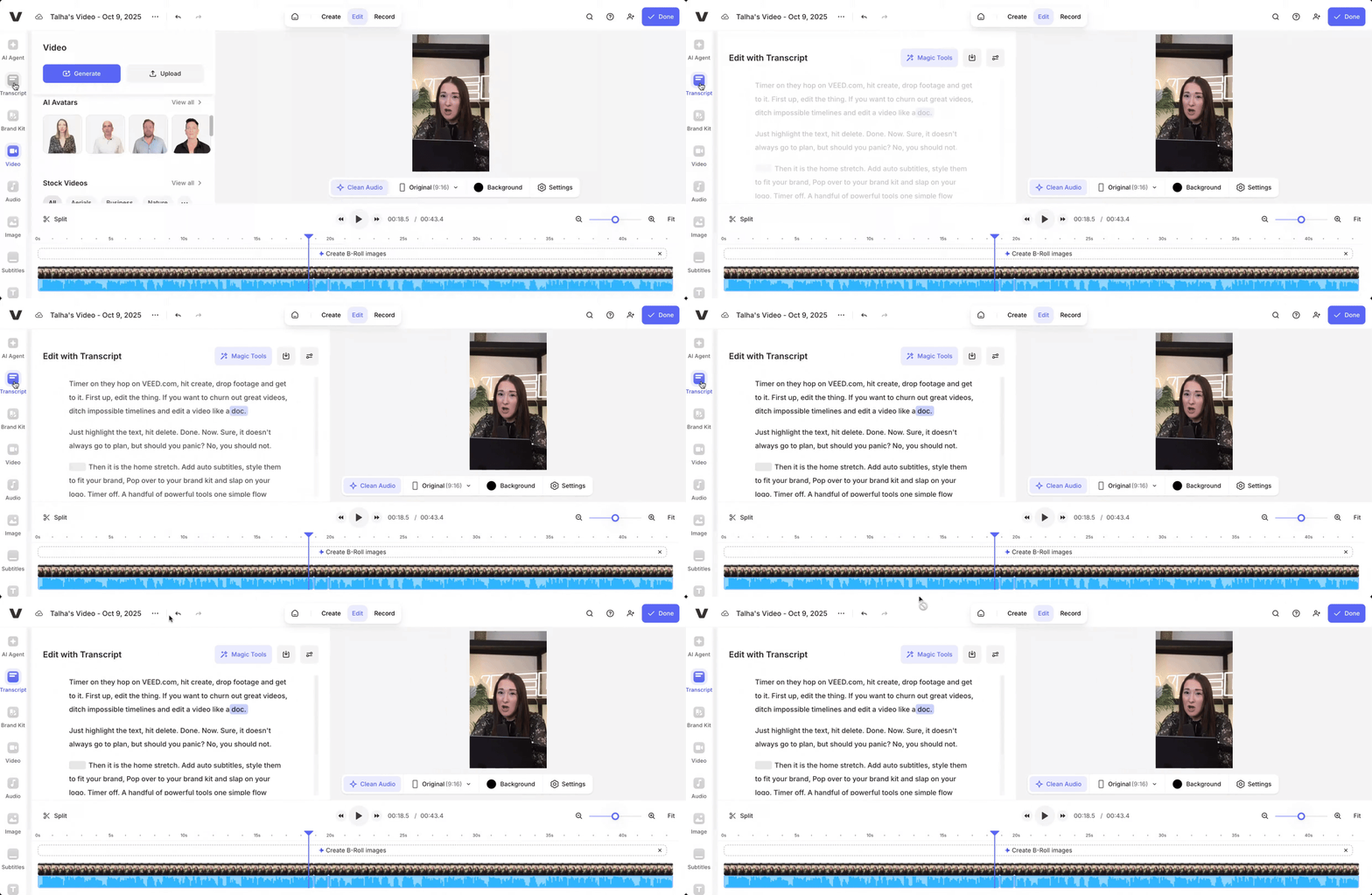
Next, select the part of the transcript you want to tweak. And click on Rephrase. Then, type out what you want to update your script with, and click on Generate. Wait for a few seconds for the rephrase process to finish, and viola! AI will automatically update your video. It really is as easy as editing a document.

2. Get studio-grade audio quality with Clean Audio
Unwanted background noise can really impact the overall quality of your video. Luckily, you don’t need an expensive microphone to achieve that quality.
With your video uploaded on VEED, simply click on the Clean Audio button which you’ll find above the timeline, as shown in the GIF.
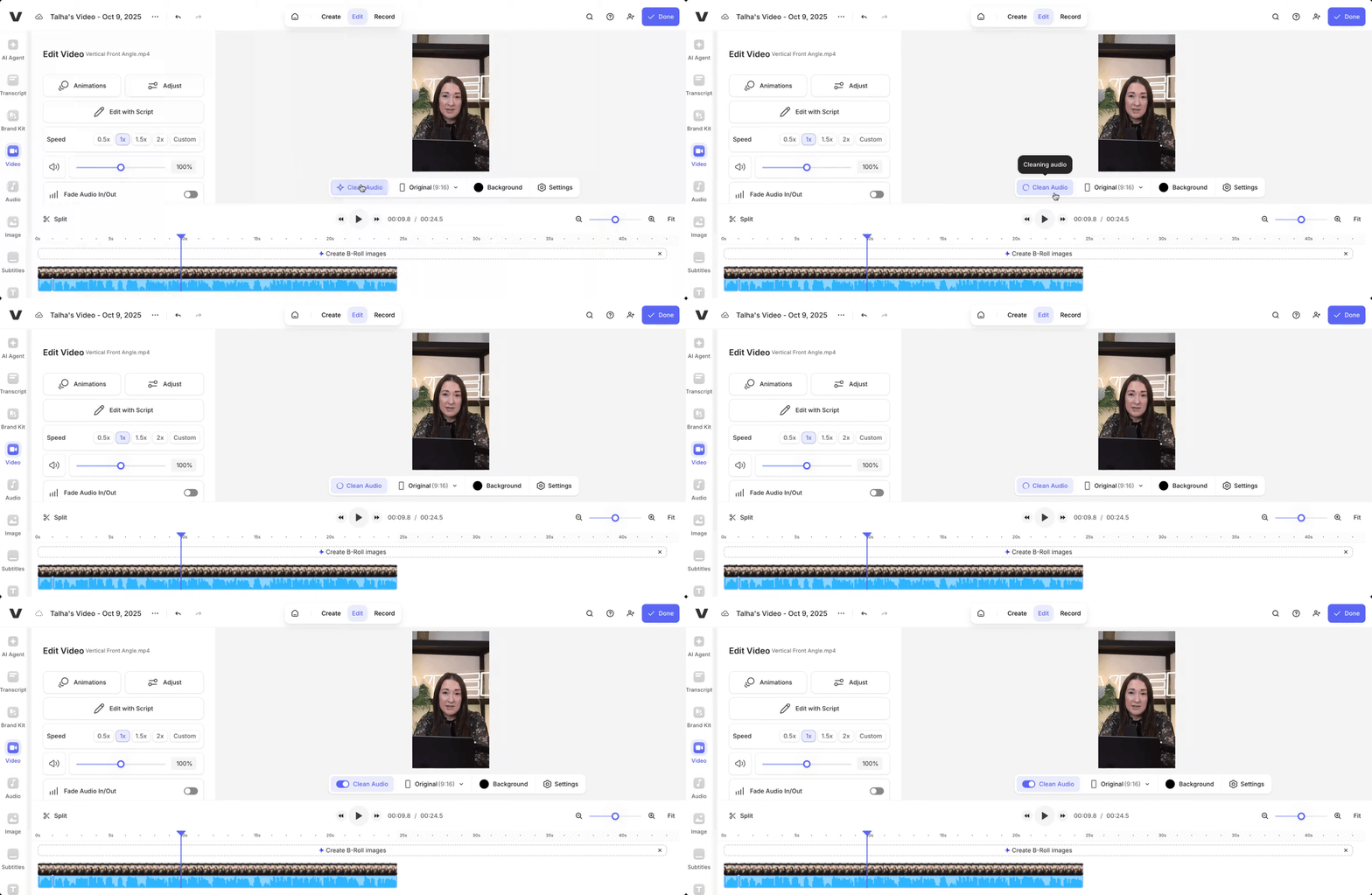
With a single click, AI will remove unwanted background noise from your recorded video, resulting in crisp, studio-grade audio.
3. Add visually-appealing dynamic subtitles
Bold, moving on-screen subtitles grab attention, guide viewers through the story, and make videos more likely to be shared. And with VEED, adding them is really easy.
On the VEED editor, click on Subtitles in the left-hand panel. Then, click on Auto-subtitle in English (if your video is in another language, you’ll need to select it from the dropdown menu above the button).
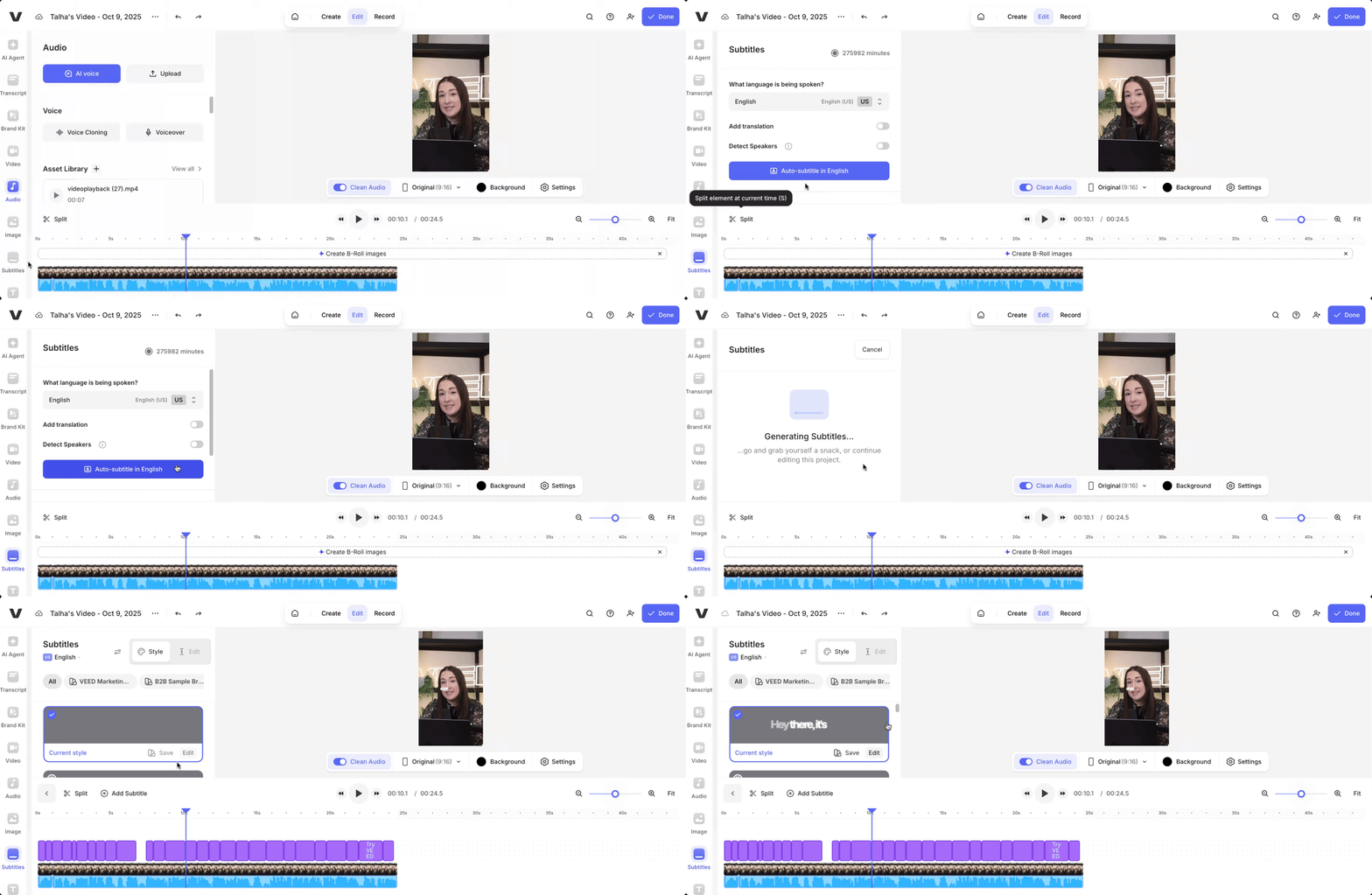
Wait for the subtitles to generate. Once generated, click on Style, and select Social from the top by scrolling horizontally (as shown in the GIF below).
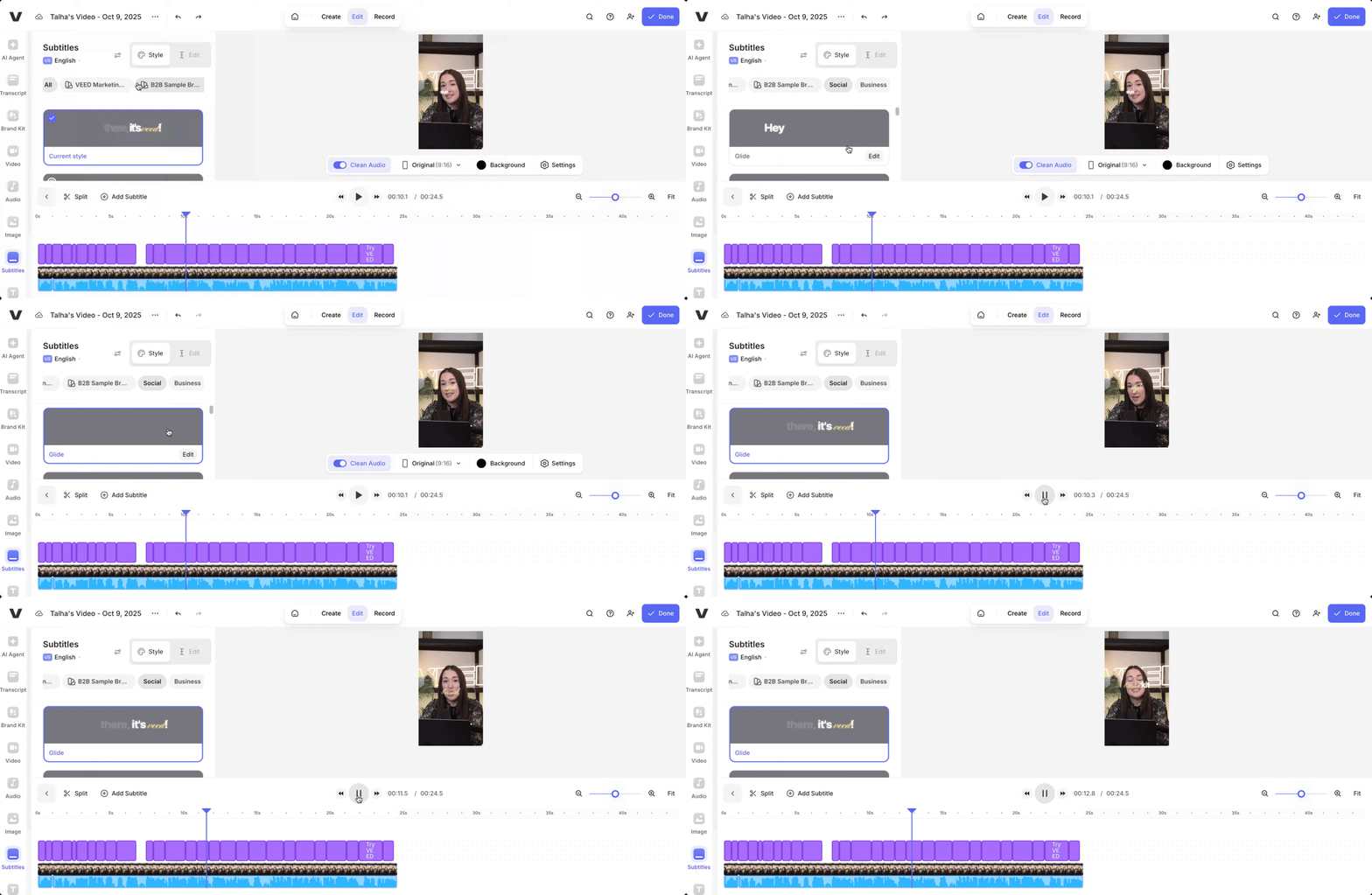
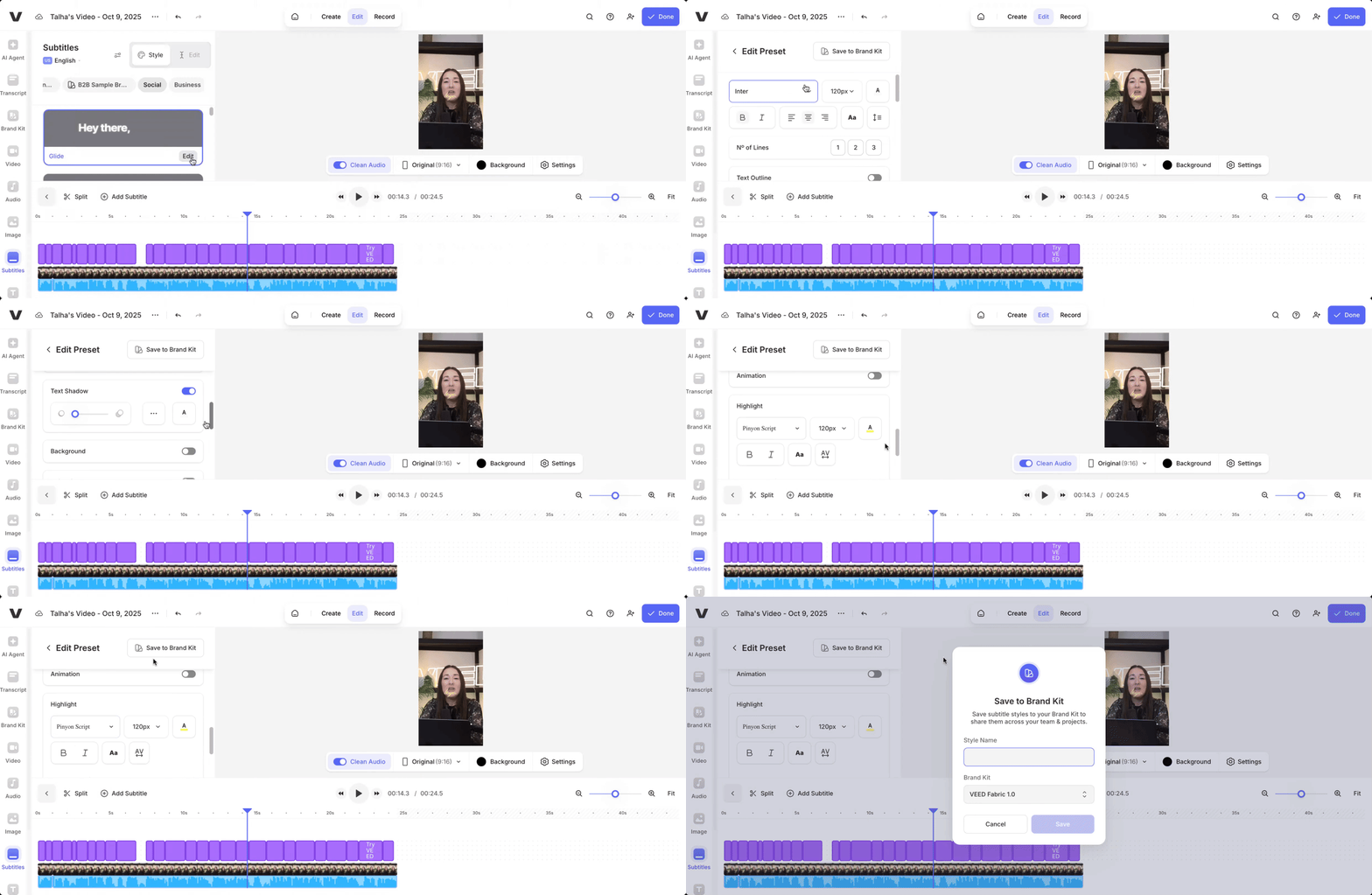
Next, select a preset style that you like. You can also Edit a preset and upload your own brand fonts. Once done, click on Save to Brand Kit, and the style will appear for everyone on your workspace.
4. Add your brand assets
Next, make your talking head video on-brand by adding your branded assets. If you’ve already built a brand kit on your VEED workspace, you can easily access it by clicking on Brand Kit in the left-hand panel.
Select the brand kit you want to use from the dropdown menu above (you can build multiple kits). Next, select the assets you want to add to your video project, ranging from videos, audio, images, and even fonts and colors. At this point, you can also upload your assets and add to your existing brand kits as needed.
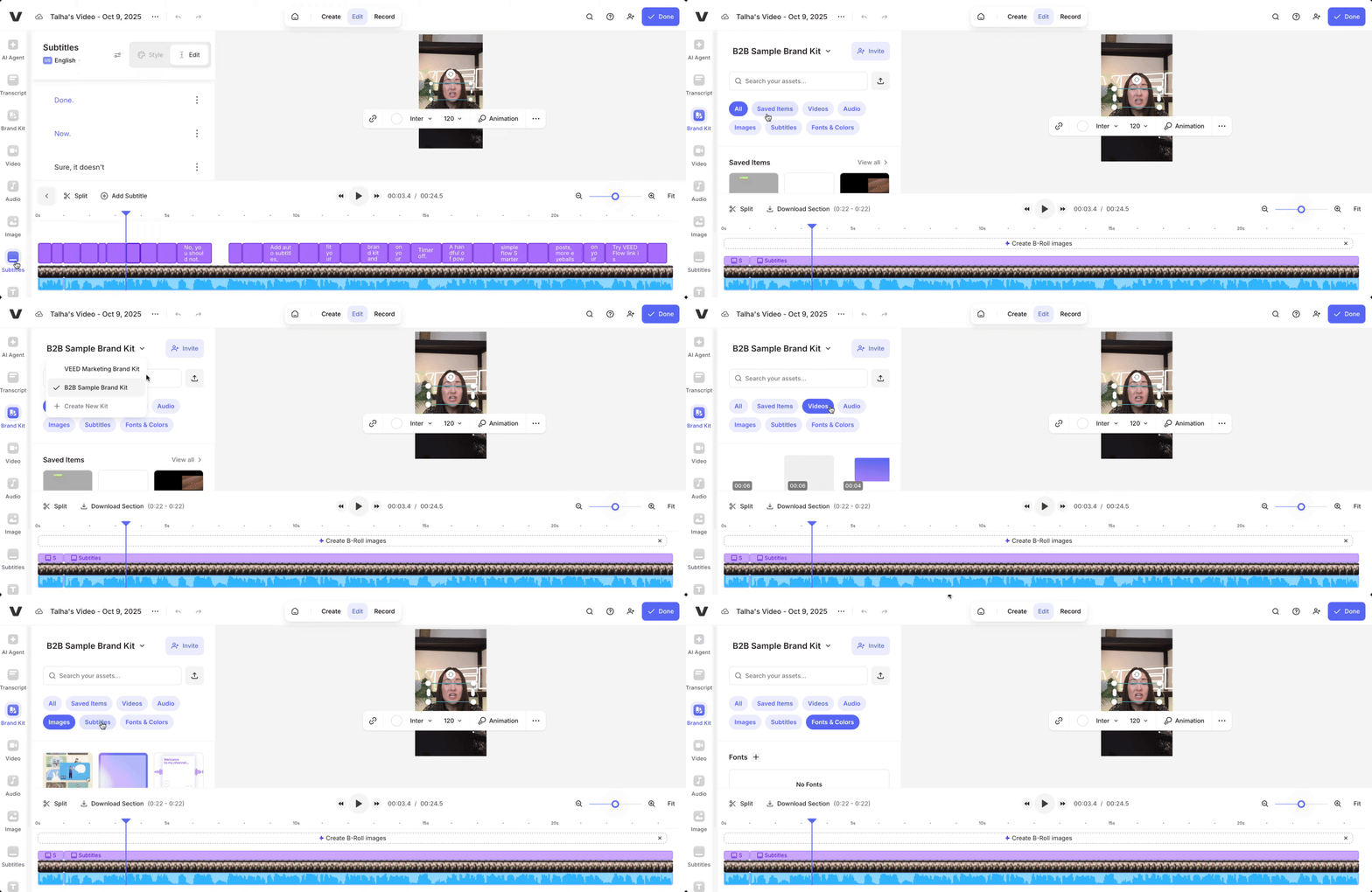
All team members on your shared workspace can access the brand kits and assets on VEED, making it easy to create on-brand videos at scale.
5. Invite collaborators to your project
You can invite key stakeholders and collaborators to your video project to get their feedback and edits.
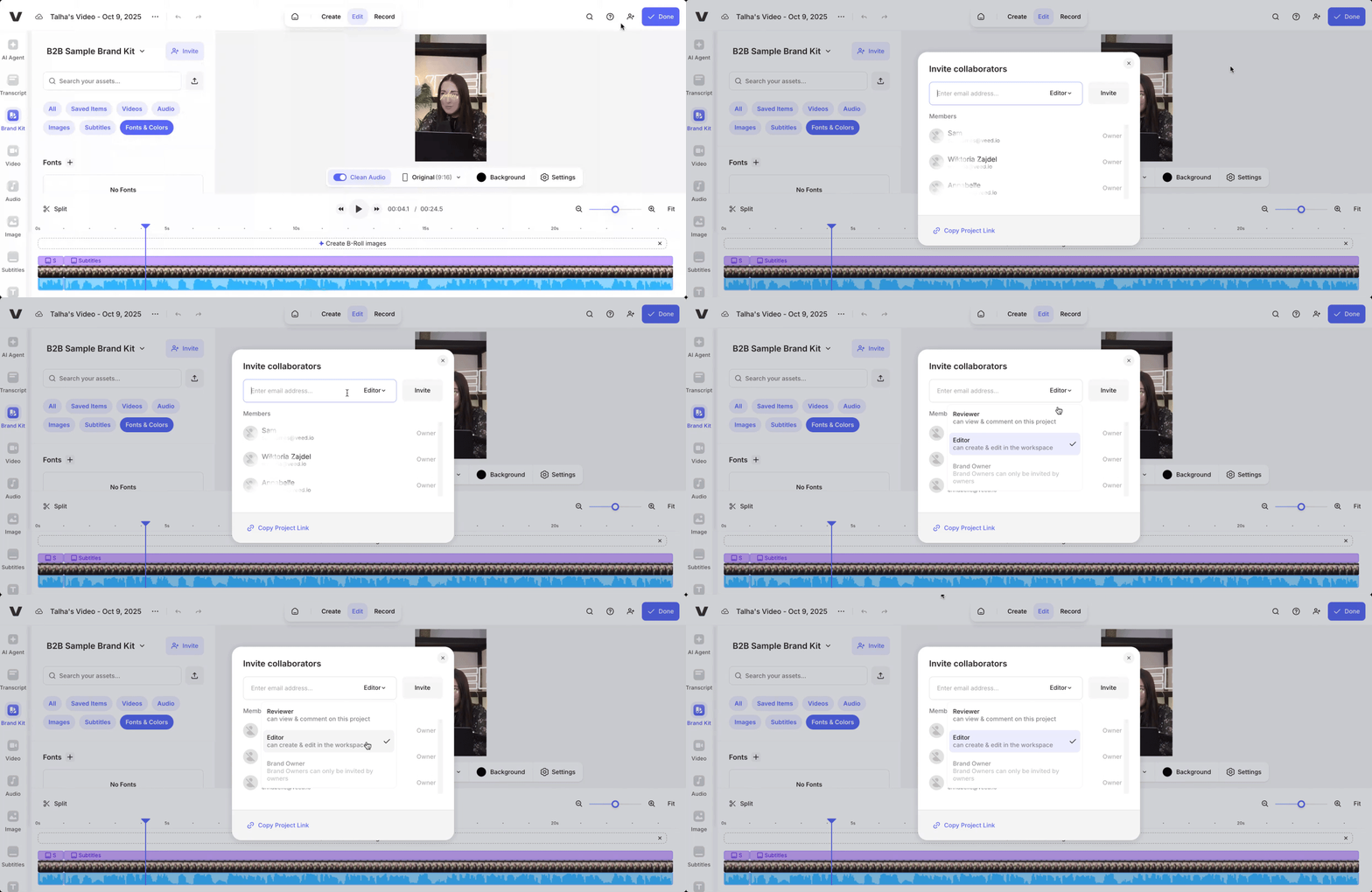
To do this, simply click on the icon at the top-right corner (next to Invite). And then, add the email address of the stakeholders you’d like to invite to your project. You can also decide whether they can make direct edits to the project (Editor) or only leave feedback as comments (Reviewer).
What this means for your brand
Pro-level edits with zero learning curve
Traditional video editing eats up hours of cutting, fixing, and formatting. VEED Flow gives you studio-quality results in minutes. You don’t need experience, training, or complicated software. Just upload, edit your transcript, and let the AI handle the rest.
Drive engagement with on-trend subtitles
Messy audio and outdated captions lose attention fast. VEED Flow keeps your audience watching with crystal-clear sound and dynamic subtitles that move, animate, and match social media trends. Viewers stay focused, and your content feels instantly polished.
Create more videos, faster
Scaling your content shouldn’t mean drowning in tedious tasks. VEED Flow automates the boring parts of video creation so you can focus on storytelling and strategy. You can easily repurpose, re-edit, and publish more videos in less time.
Stay consistent and on-brand
With Dynamic Subtitles and Brand Kit integration, every video you publish looks professional and consistent. Use your brand fonts, colors, and styles to keep your videos instantly recognizable across all platforms.
Collaborate with your team effortlessly
From brainstorming to final export, VEED Flow lets you share projects, leave comments, and work together in real time. Everyone stays aligned, and feedback loops stay short.
Scale on-brand video creation today
No more waiting for editors. No more messy exports. No more creative slowdown.
With VEED Flow, you can move from idea to published video in a single sitting, all within the same tool.
Your videos deserve to look as good as your message sounds. Let VEED Flow make that effortless.
👉 Try VEED Flow today and see how fast professional video creation can be.
.jpg)
.png)